Level 4, lesson 3 of 3 · 4 min
The figures for your tax return
Calculate and download, adding your expenses, and the rules for a small shop.
This is not tax advice
These lessons help you on your way, but rules and amounts change. Always check the government for the latest information, and ask your accountant when in doubt.
At the end of a quarter you file your tax return. EasyConsign puts together the figures you need.
Calculate and download
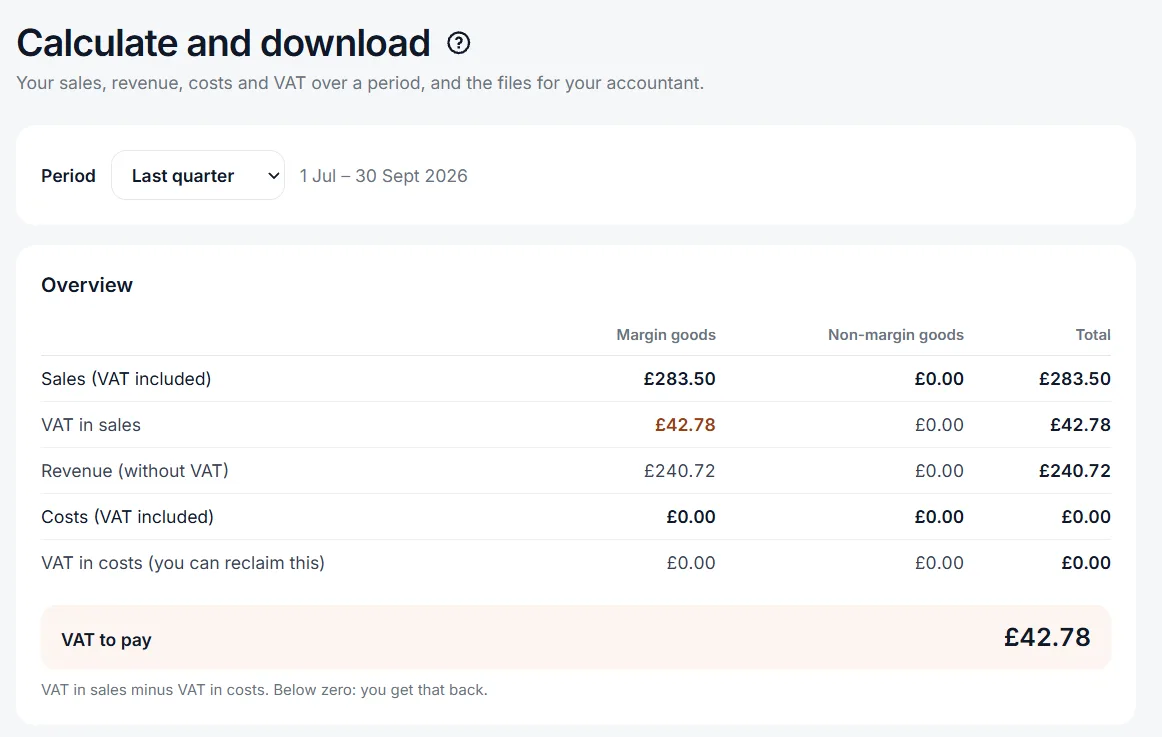
Go to Accountancy > Calculate and download and choose a period, for example Last quarter. You then see, for margin goods and the rest separately:
- your sales, with BTWVAT,
- your revenue, without BTWVAT,
- your expenses, with the BTWVAT you can reclaim,
- the BTWVAT to pay.
Below that is the margin calculation, like in the last lesson.
Excel files for your bookkeeping or accountant
You download two Excel files: Sales and Expenses. Each starts with the main amounts, then one line per sale or expense. Does your bookkeeping software work with CSV? Then download the same files as CSV.
What you don't add isn't in it
EasyConsign knows what you sell, but not what you spend. Add your expenses under Accountancy > Add expense: rent, energy, clothing racks, and secondhand things you bought yourself.
A small shop
If your revenue is under €20,000 a year, you can sign up for the kleineondernemersregeling (KOR), the small businesses scheme. You then don't charge BTW, but you can't reclaim BTW on your expenses either.
You have to register for VAT when your taxable turnover over the last 12 months goes over £90,000. There are a few other rules, for example for one very large order. Check GOV.UK for those. You may also register voluntarily.
Want to know more?
The help center shows exactly which buttons to use.
Read the guide: Calculate and downloadThat was the last lesson. Ready to start?
Try it for free