What equipment do you need?
A computer with Firefox is enough to start. This is what you can add, and where to buy it.
Updated October 20, 2026
You don't need an expensive cash register. A computer with Firefox is enough to start. Want to work faster? Then add a few separate devices. They work with any brand, as long as your computer recognizes them.
Below are the devices we recommend, with links for the country you choose at the top. This advice is from October 2026. Products change and sometimes disappear from stores. If a link no longer works, look for a device that matches on the same points. We don't earn anything from these links.
The minimum
- A computer (laptop or desktop) with Firefox for the register. Windows, Mac and Linux all work.
- Internet in the shop.
You can also add items and check your numbers on your phone or tablet.
A receipt printer
A thermal receipt printer prints on a roll of paper without ink. EasyConsign works with rolls 58 mm and 80 mm wide. You choose the width when you set up the printer.
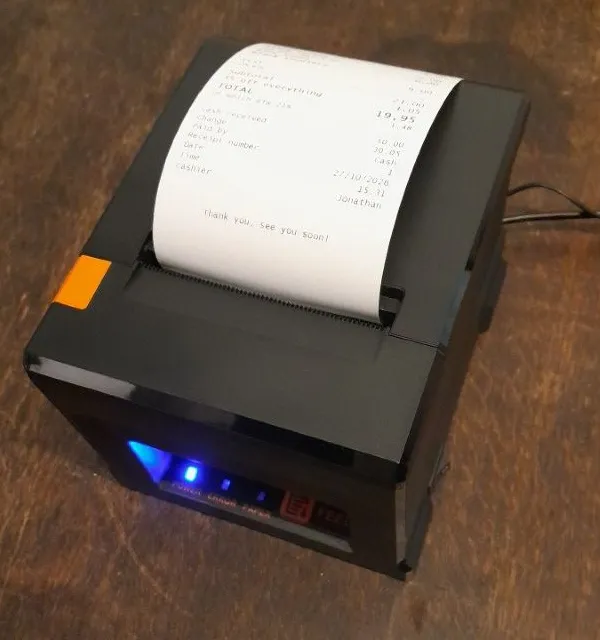
We recommend 80 mm. That's the regular desktop printer you see at most shop counters. This is how they usually differ:
| 80 mm desktop printer | 58 mm small printer | |
|---|---|---|
| Speed | 200 to 300 mm per second: the receipt is out in a second | 50 to 90 mm per second: you wait a few seconds |
| Cutting | Cuts the receipt itself | No cutter: you tear the receipt off along a serrated edge |
| Roll | Large, you change it less often | Small, change it more often |
| Power | Its own power adapter | Often a battery you have to charge |
| Connection | Usually USB | Often Bluetooth, sometimes USB |
| Receipt | Wide, long names fit better | Narrow, long names wrap to two lines more often |
| Price | About 50 to 120 (euros or pounds) | About 25 to 50 (euros or pounds) |
These are typical figures. Always check what the maker states for a printer. How sharp the receipt is doesn't depend on the width: almost all receipt printers print equally fine.
A 58 mm printer is fine for a small shop that doesn't print many receipts. Choose one with USB, see below.
Our pick: this thermal receipt printer on Amazon.
- It prints fast: the receipt is out right away, even with a line at the counter.
- It cuts the receipt itself. No torn edges, and your hands stay free.
- It connects to your computer by USB. That's more reliable than Bluetooth.
- It has its own power adapter, so no battery running flat in the middle of a busy Saturday.
Our pick: an 80 mm desktop printer that connects to your computer by USB, has its own power adapter and cuts the receipt itself (search for auto cutter). USB is more reliable than Bluetooth, and with an adapter there's no battery running flat in the middle of a busy Saturday. Search on Amazon.
Prefer another one? Make sure it works over USB with Windows or Mac, not only with an app on your phone. How to set up the printer is in Setting up the receipt printer.
Watch out with USB: a USB cable in the box doesn't mean the printer prints over USB. With some printers, that cable is only for charging. Check that it says you install it as a printer on your computer over USB, or that it comes with a driver.
Receipt rolls should match the width of your printer. For 80 mm, search for thermal till rolls 80 x 80 mm. For 58 mm, search for 57 mm till rolls: they fit a 58 mm printer.
Receipt rolls are called till rolls in the UK. For an 80 mm printer, search for 80 x 80 mm till rolls. For 58 mm, search for 57 mm till rolls: they fit a 58 mm printer.
A barcode scanner
With a handheld scanner, you check out by just scanning the barcode. A regular USB scanner is enough. It works like a keyboard: whatever it scans appears where your cursor is. You don't need to install anything. A wireless scanner with a USB receiver works too.
We don't have a fixed pick here. Almost any USB scanner works. Choose one yourself:
Labels for your items
You can print labels from a roll or on A4 sticker sheets. We recommend a thermal label printer with a roll. Every label comes out exactly right, so you never have to fiddle with the alignment. You also don't have to choose where to start on each sheet. That makes it quicker.
A thermal label printer (recommended)
A thermal label printer with a roll of labels. You print one label per item, without ink. Handy if you add a lot of items every day.
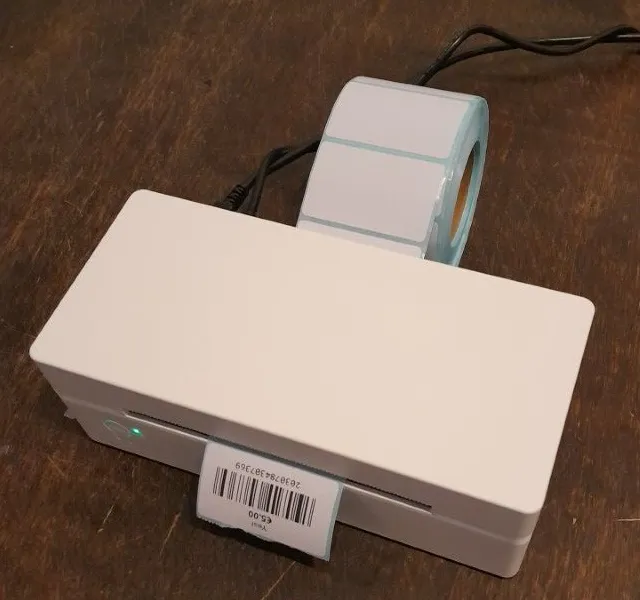
Our pick: this label printer on Amazon.
Our pick: a thermal shipping label printer. Search on Amazon.
It's a printer for shipping labels, but it prints small labels from a roll just fine. Small mini label printers often only work with an app on your phone, and then you can't print to them from EasyConsign.
Labels for this printer: these rolls on Amazon.
Labels for this printer: rolls of thermal labels on Amazon.
Under Barcode labels > Print items, choose Thermal roll and enter the size of the labels.
The roll behind the printer
A shipping label printer has no room for a roll inside. The roll sits behind the printer, and the labels feed in through a slot at the back.
You can simply put the roll on the table behind the printer. That works, but it's a bit wobbly: the roll can roll away or pull crooked, and then a label can jam.
A roll holder is steadier. It's a stand with a bar you slide the roll onto. Put it right behind the printer, so the labels go straight into the slot.
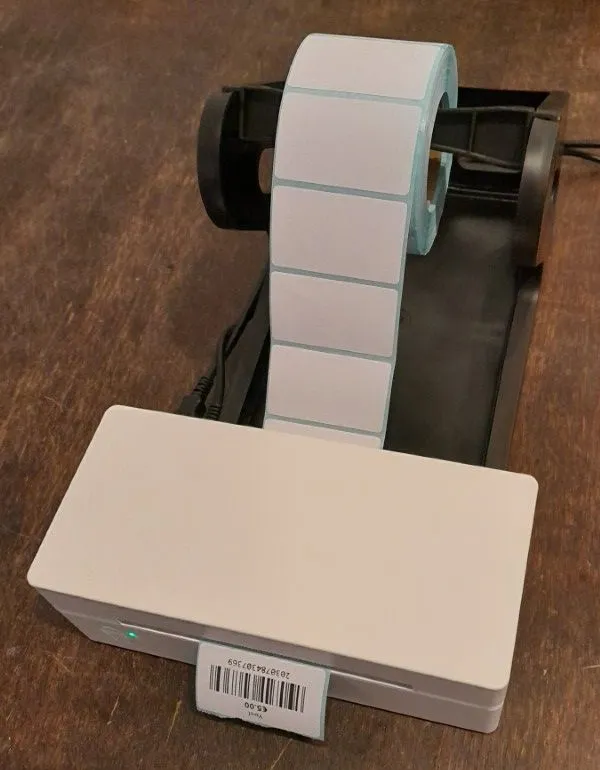
Search: label roll holders on Amazon
Search: label roll holders on Amazon
A4 sticker sheets
A4 sticker sheets for the printer you already have. A cheap way to start. A popular one is Avery L7654 (40 labels per sheet, 45.7 × 25.4 mm). See Printing barcode labels.
Search: Avery L7654 on Amazon
Search: Avery L7654 on Amazon
A cash drawer and a card terminal
EasyConsign doesn't control a cash drawer or a card terminal. Use a separate cash drawer and the card terminal from your bank or payment provider. When you check out, you choose in EasyConsign whether the customer paid by cash or card.
Not sure?
Send us a message with what you're thinking of buying. We're happy to take a look.