Level 3, lesson 1 of 4 · 4 min
Selling at the register
A sale from start to finish, with a discount, change and the receipt.
The register is ready. A customer comes to the counter with a coat and two books. This is how you check out.
Step by step
- Log in at easyconsign.app/pin with your name and register code.
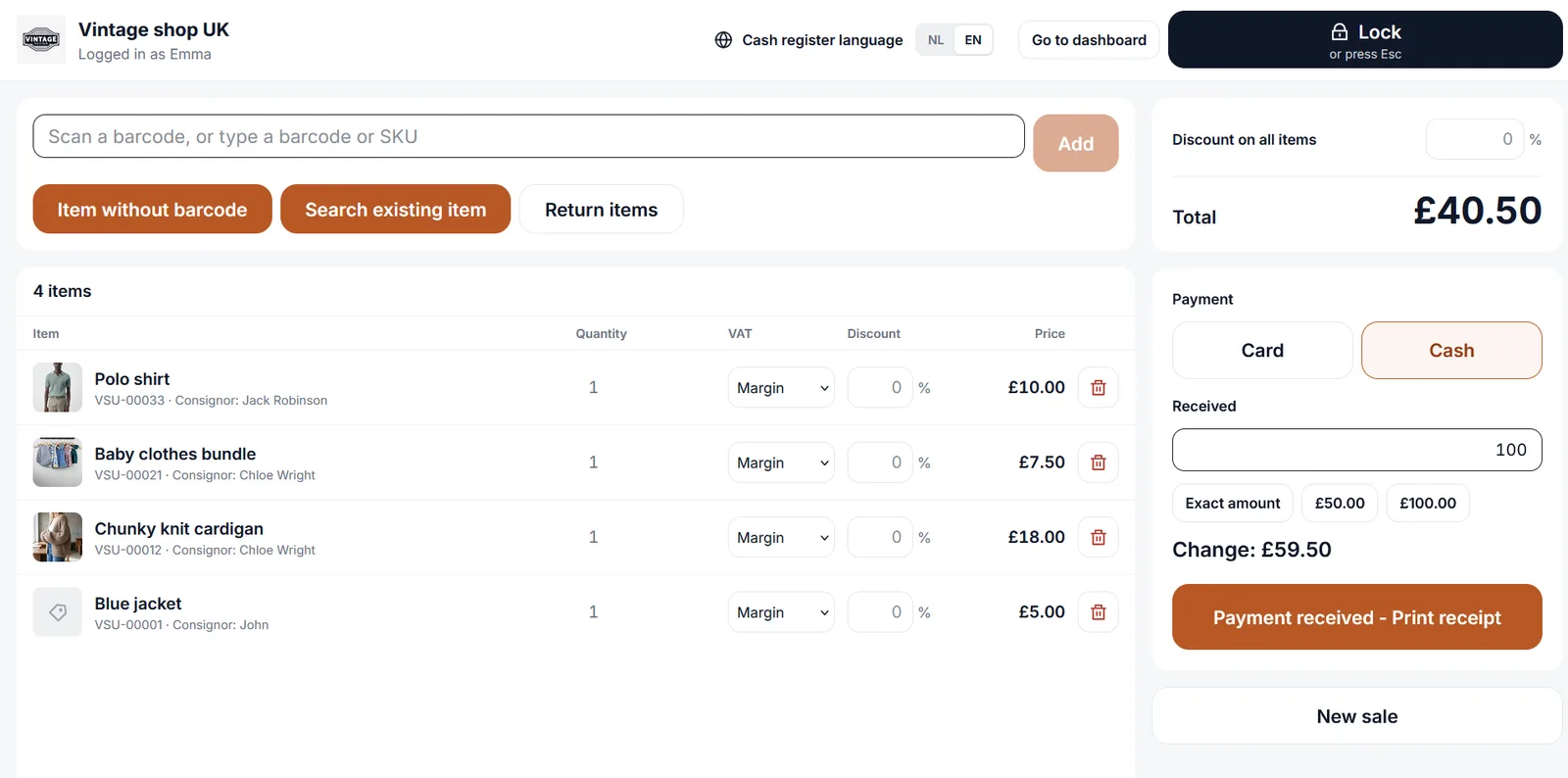
- Scan the barcode of each item. The item goes on the receipt with its price.
- Something without a barcode? Add it by hand, with a name and a price.
- Give a discount if you like, on one line or on the whole receipt.
- Choose Cash or Card. With cash you enter what the customer gives, and you see how much change to give.
- The receipt comes out of the printer.
What happens next, by itself
After checking out you don't need to keep track of anything:
- the items are sold and off your stock,
- the consignor's share goes to that consignor's balance,
- the consignor sees the sale through their own link,
- the sale is in Sales receipts and counts toward your revenue.
A mistake on the receipt
Rang something up wrong? Delete a sale from today in Sales receipts, as if it never happened. Notice it later, or does the customer bring something back? Then you do a refund. That's the next lesson.
Want to know more?
The help center shows exactly which buttons to use.
Read the guide: Checking out at the register