Level 2, lesson 4 of 5 · 3 min
Consignors and their link
Adding consignors, and how they check their own items with a personal link.
In level 1 you saw what a consignor is. Now you add consignors to EasyConsign, so the register knows whose item is whose.
Adding a consignor
Go to Consignors > Add consignor. Fill in the name, and the email address if you have it. Every consignor gets a number. That's handy to write on a bag or in a notebook.
Add a new consignor before you add their items. Then you can pick the consignor right away for each item.
The personal link
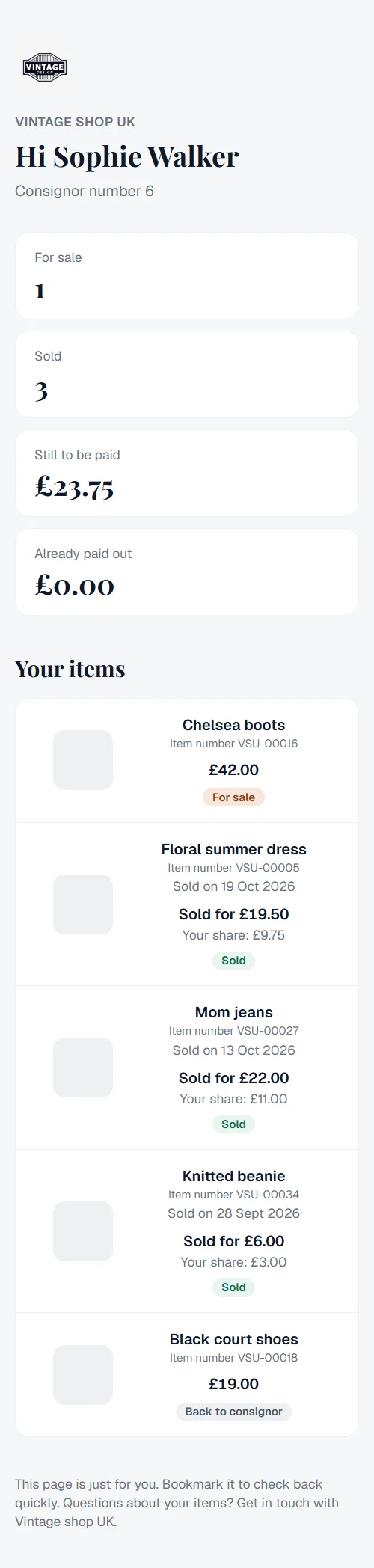
Every consignor can get a personal link. With it the consignor sees on their own phone:
- which items are in your shop, with the price,
- what has sold and when,
- the balance: what you still owe them,
- the payouts.
If the consignor has an email address, they get the link by email right away. Without an email address you create the link yourself and send it on, for example by WhatsApp.
Safe
The link is long and random, so nobody can guess it. A consignor doesn't need to create an account or password. Did a link end up with the wrong person? Create a new link. The old one stops working right away.
Want to know more?
The help center shows exactly which buttons to use.
Read the guide: The personal link for consignors